
Third Parties
Third Party Risk → Third Parties lists every third party you monitor. The number in the menu item is how many there are. Select a row to open that third party's dashboard. See Individual Third Party Dashboard.
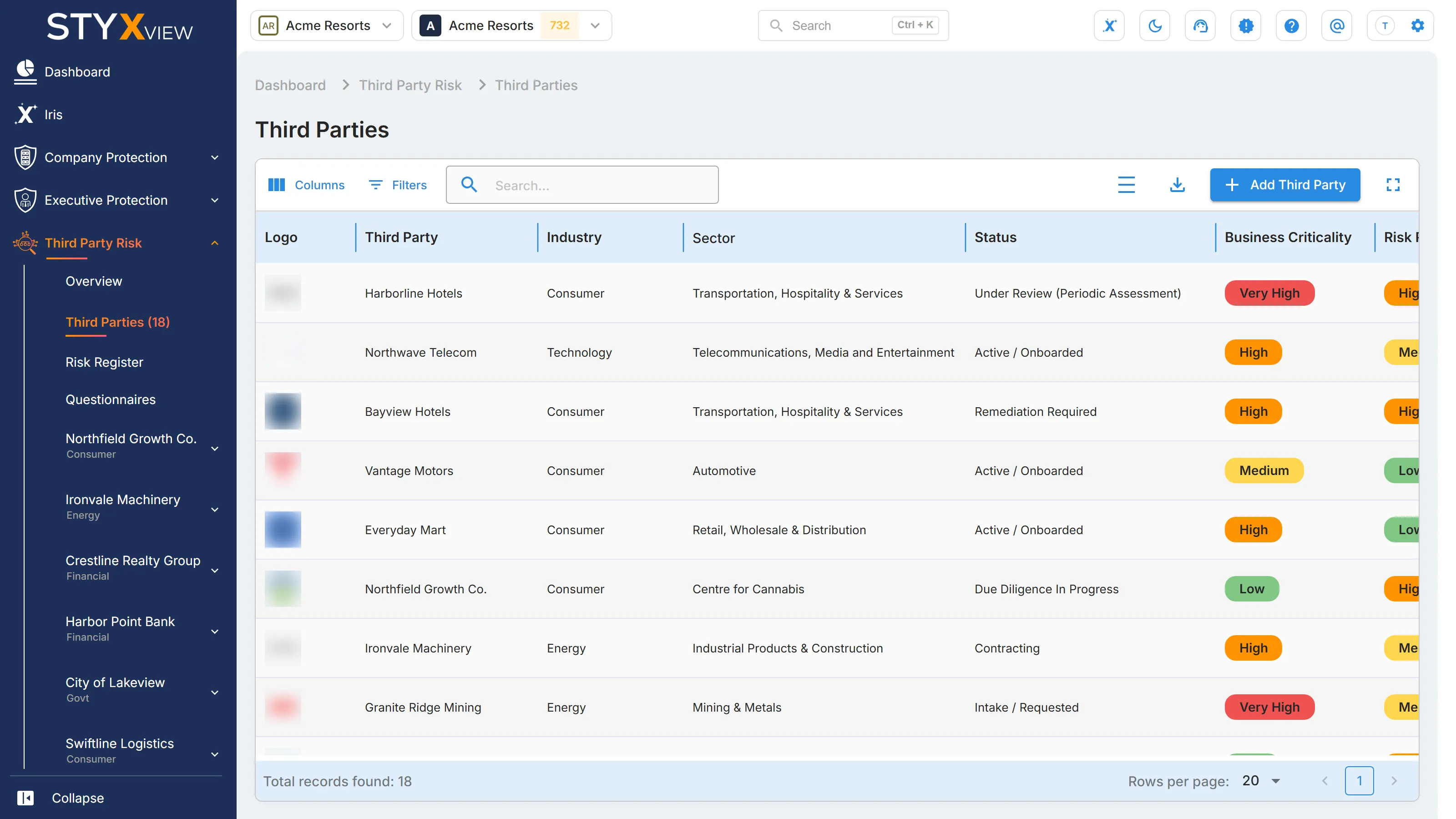
| Column | What it shows |
|---|---|
| "Logo" | The third party's logo. |
| "Third Party" | The third party's name. |
| "Industry" | The broad industry it operates in, such as "Financial", "Govt", "Consumer", or "Energy". |
| "Sector" | A more specific sector within the industry, such as "Banking & Capital Markets" or "Regional and Local Government". |
| "Status" | The third party's lifecycle status, set by your team. See Lifecycle statuses. |
| "Business Criticality" | Your own rating of how much your business depends on the third party: "Very Low", "Low", "Medium", "High", or "Very High". |
| "Risk Rating" | The rating of the third party's Digital Risk Score: "Low", "Medium", "High", or "Very High". |
| "Digital Risk Score" | The third party's latest Digital Risk Score, from 0 to 1000. |
| "Breach Disclosure" | "Breached" if at least one of the third party's domains was found in a data breach, otherwise "No Records". |
| "Last Updated" | The date of the latest Digital Risk Score. |
| "Description" | Your description of the relationship. Hidden by default; turn it on from "Columns". |
Use "Columns", "Filters", and the search box above the table to narrow the list, and the export option to download it. To add a third party, select "Add Third Party". See Add Third Party.
Lifecycle statuses
Section titled “Lifecycle statuses”A third party's lifecycle status records where it stands with your organisation. StyxView does not change it automatically. Set it from the third party's dashboard with Actions → Change Lifecycle Status. A third party added from the shared database starts as "Identified".
| Status | Meaning |
|---|---|
| "Identified" | Discovered or proposed; early scoping only. |
| "Intake / Requested" | A formal request has been submitted; waiting for approval to begin assessment. |
| "Pre-Screening / Initial Risk Assessment" | Basic screening to decide the inherent risk and how much due diligence is needed. |
| "Due Diligence In Progress" | Questionnaires, evidence collection, and risk analysis are under way. |
| "Remediation Required" | Gaps were found; the third party must address them before approval. |
| "Approved / Authorized" | Passed due diligence; cleared for contracting or onboarding. |
| "Contracting" | Legal and procurement are negotiating terms, such as the service level agreement (SLA) and data processing agreement (DPA). |
| "Active / Onboarded" | Active and operating within your organisation's ecosystem. |
| "Under Review (Periodic Assessment)" | A scheduled reassessment; compliance and risk changes are being monitored. |
| "Suspended / On Hold" | Temporarily paused because of concerns, incidents, or internal decisions. |
| "Flagged - Risk Event" | An incident, breach, or compliance issue is under investigation. |
| "Offboarding / Termination in Progress" | Being phased out; access revocation and data handling are in progress. |
| "Rejected / Not Approved" | Did not meet requirements and cannot be used. |
| "Offboarded / Decommissioned" | The relationship has ended; access is removed and data handled. |