

Executive Profile
Overview
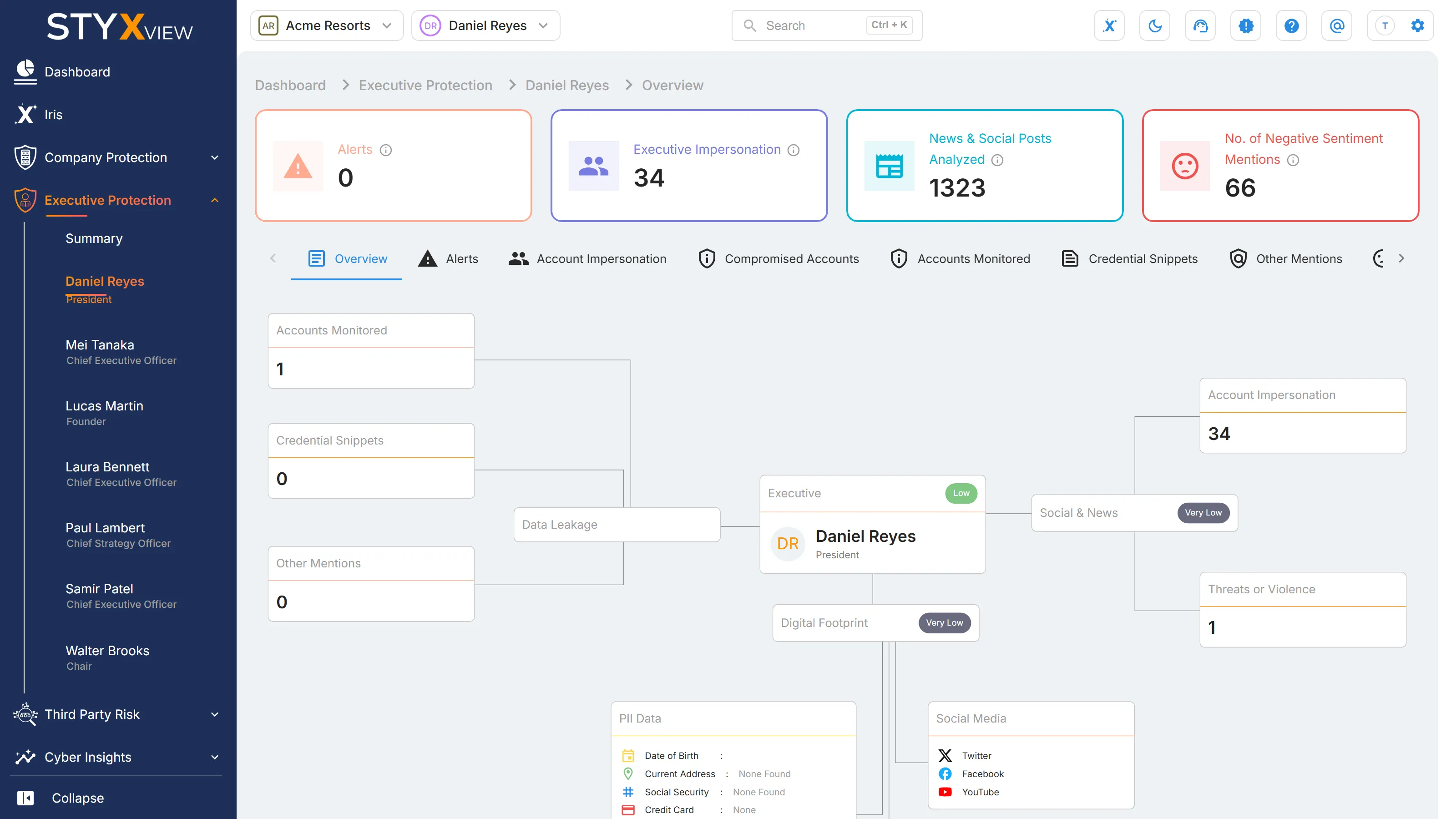
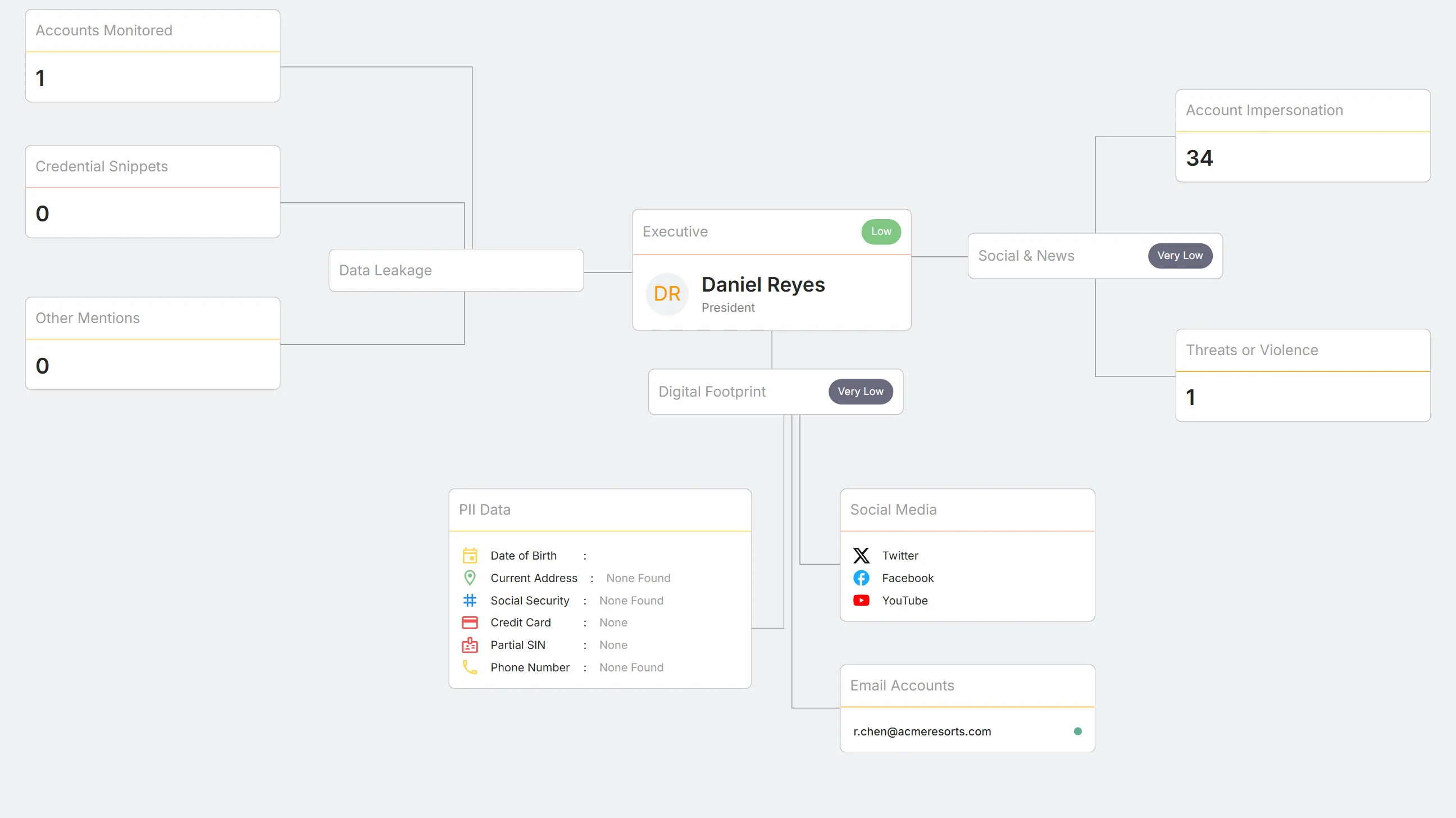
Section titled “Overview”An executive's "Overview" maps what Executive Protection has found about one person on a single diagram: their overall risk rating, and the counts and details behind it.
To open it, select the executive's name under Executive Protection in the sidebar, or select their initials on the Summary page. While you are on an executive's pages, their name and title appear in the top bar.
Above the tabs, four tiles count for this executive only: "Alerts", "Executive Impersonation", "News & Social Posts Analyzed", and "No. of Negative Sentiment Mentions". They count the same things as on the Summary page. Select a tile to open the matching tab.
Executive
Section titled “Executive”The centre box, "Executive", shows the executive's initials, name, title, and overall risk rating. Summary explains how the rating is set.
Data Leakage
Section titled “Data Leakage”"Data Leakage" groups three counts. Select a count to open its tab.
| Box | What it counts |
|---|---|
| "Accounts Monitored" | The executive's email addresses under monitoring. |
| "Credential Snippets" | Distinct leaked text fragments that contain the executive's credentials. |
| "Other Mentions" | Mentions of the executive found on the dark web and other sources. |
Social and News
Section titled “Social and News”"Social & News" carries the executive's "Social Media Exposure" rating. Select it to open "Social & News Analytics".
| Box | What it counts |
|---|---|
| "Account Impersonation" | Accounts impersonating the executive, in any status, excluding false positives. Opens "Account Impersonation". |
| "Threats or Violence" | Posts about the executive flagged for threats, violence, or profanity. Opens "Adverse Media". |
Digital Footprint
Section titled “Digital Footprint”"Digital Footprint" carries the executive's "Personal Info. Exposure" rating.
- "PII Data": "Date of Birth", "Current Address", "Social Security", "Credit Card", "Partial SIN", and "Phone Number". Each shows what was found for the executive. "None Found" or "None" means nothing was found.
- "Social Media": the platforms where the executive has a known account.
- "Email Accounts": the executive's known email addresses.
Alerts
Section titled “Alerts”This tab is described in Summary → Alerts.
Account Impersonation
Section titled “Account Impersonation”This tab is described in Account Impersonation → Impersonating Social Media Accounts → In Executive Protection.
Compromised Accounts
Section titled “Compromised Accounts”This tab is described in User Accounts → Compromised Accounts → In Executive Protection.
Accounts Monitored
Section titled “Accounts Monitored”This tab is described in User Accounts → Accounts Monitored → In Executive Protection.
Credential Snippets
Section titled “Credential Snippets”This tab is described in Exposed Credentials → Snippets → In Executive Protection.
Other Mentions
Section titled “Other Mentions”This tab is described in Mentions → Other Mentions → In Executive Protection.
Disinformation Monitoring
Section titled “Disinformation Monitoring”This tab is described in Disinformation Monitoring.
Negative Sentiments
Section titled “Negative Sentiments”This tab is described in Summary → Negative Sentiment.
Adverse Media
Section titled “Adverse Media”This tab is described in Summary → Adverse Media.
Social & News Analytics
Section titled “Social & News Analytics”This tab is described in Summary → Social & News Analytics.
Social & News (ALL)
Section titled “Social & News (ALL)”This tab is described in Summary → Social & News (ALL).