
Response Actions / Takedowns
Overview
Section titled “Overview”Styx manages takedowns from start to finish. You request a takedown from a finding in StyxView. The Styx takedown team puts the case together and files it with the service provider: the host, registrar, social platform, app store, or registry carrying the content. You follow the request in "Response Actions", where every step is recorded.
A takedown is one kind of response action. Others are domain suspensions and account suspensions.
Takedown requests count toward the takedown allowance of your plan for the current term. The top of "Response Actions" shows how many takedowns you have used and, when your plan sets a limit, how many remain. The Subscriptions page shows the same allowance.
Categories of Takedowns
Section titled “Categories of Takedowns”Styx handles takedowns in the categories below. A service provider acts only when there is clear impersonation, infringement, or malicious activity, so each category lists what is and is not eligible.
1. Domain Impersonation
Section titled “1. Domain Impersonation”Lookalike or spoofed domains that misuse your brand name to deceive people.
Eligible
- A domain hosting a phishing site, a fake login page, or content that abuses your brand, such as your logo, trademarks, or brand name used to deceive.
- A domain used to send fraudulent email that impersonates your brand. Evidence such as email headers is required.
- A domain with clear trademark or logo infringement that could mislead your customers.
- Defacement or misuse of your brand assets, such as your official logo or copyrighted content.
Not eligible
- A domain that contains your brand name in its address but shows no abusive content.
- A parked or non-resolving domain. Keep it on your watchlist instead.
2. Account Impersonation
Section titled “2. Account Impersonation”Fake or fraudulent social media accounts that pretend to represent your brand.
Eligible
- Fake accounts that use your brand name, logo, or imagery.
- Accounts posing as official brand or support channels, for example with fake promotions or phishing links.
- Accounts impersonating your executives or staff to commit fraud or damage your reputation.
- Unauthorised accounts posing as your brand to deceive people.
Not eligible
- Inactive or empty accounts with no branding, impersonation, or abuse.
- Fan, parody, or commentary accounts that are clearly unofficial and not abusive.
3. Rogue Mobile Apps
Section titled “3. Rogue Mobile Apps”Unauthorised apps on third-party app stores or websites that mislead users, install malware, or harm your reputation.
Eligible
- Apps that use your brand name or logo without approval, distributed through third-party stores or websites.
- Apps that contain malware, phishing redirects, or deceptive content tied to your brand.
- Apps with live download links that impersonate or exploit your brand.
Not eligible
- Apps that only mention your brand in their description and do not use your trademarks or logos.
- Apps whose download links no longer work. These stay under monitoring instead.
4. Executive Profiles
Section titled “4. Executive Profiles”Fake profiles on LinkedIn, Facebook, or other platforms that impersonate your company's leadership.
Eligible
- Fake executive or leadership profiles.
- Accounts that misuse an executive's photos, name, or job title.
- Profiles that commit scams, fraud, or brand-damaging activity under an executive's identity.
Not eligible
- Generic profiles that do not use an executive's name, image, or your branding.
- Profiles with no intent to impersonate, no abuse, and no link to your brand.
5. Unauthorized Job Postings
Section titled “5. Unauthorized Job Postings”Fake job postings that misuse your brand to trick applicants, often for phishing, fraud, or data theft.
Eligible
- Fraudulent job listings that use your brand name to lure applicants.
- Postings designed for phishing, data theft, or financial scams.
- Use of your brand in job ads without approval from your HR or corporate team.
Not eligible
- Postings that mention your brand in passing, without impersonation or fraud.
- Listings on inactive or abandoned platforms where nobody is harmed.
6. Brand and Trademark Misuse
Section titled “6. Brand and Trademark Misuse”Use of your brand, logo, or name without authorisation.
Eligible
- Use of your brand name, logo, or trademarks without prior authorisation.
- Misrepresentation of an affiliation with your company through misuse of your brand.
- Commercial use of your brand assets in ways that could mislead people or harm your reputation.
Not eligible
- Non-commercial fair use, such as commentary, reviews, or satire.
- Descriptive use of a trademark or logo that does not mislead.
- Use in jurisdictions where takedown enforcement does not apply.
Steps to Request a Takedown
Section titled “Steps to Request a Takedown”You can request a takedown from findings of these types:
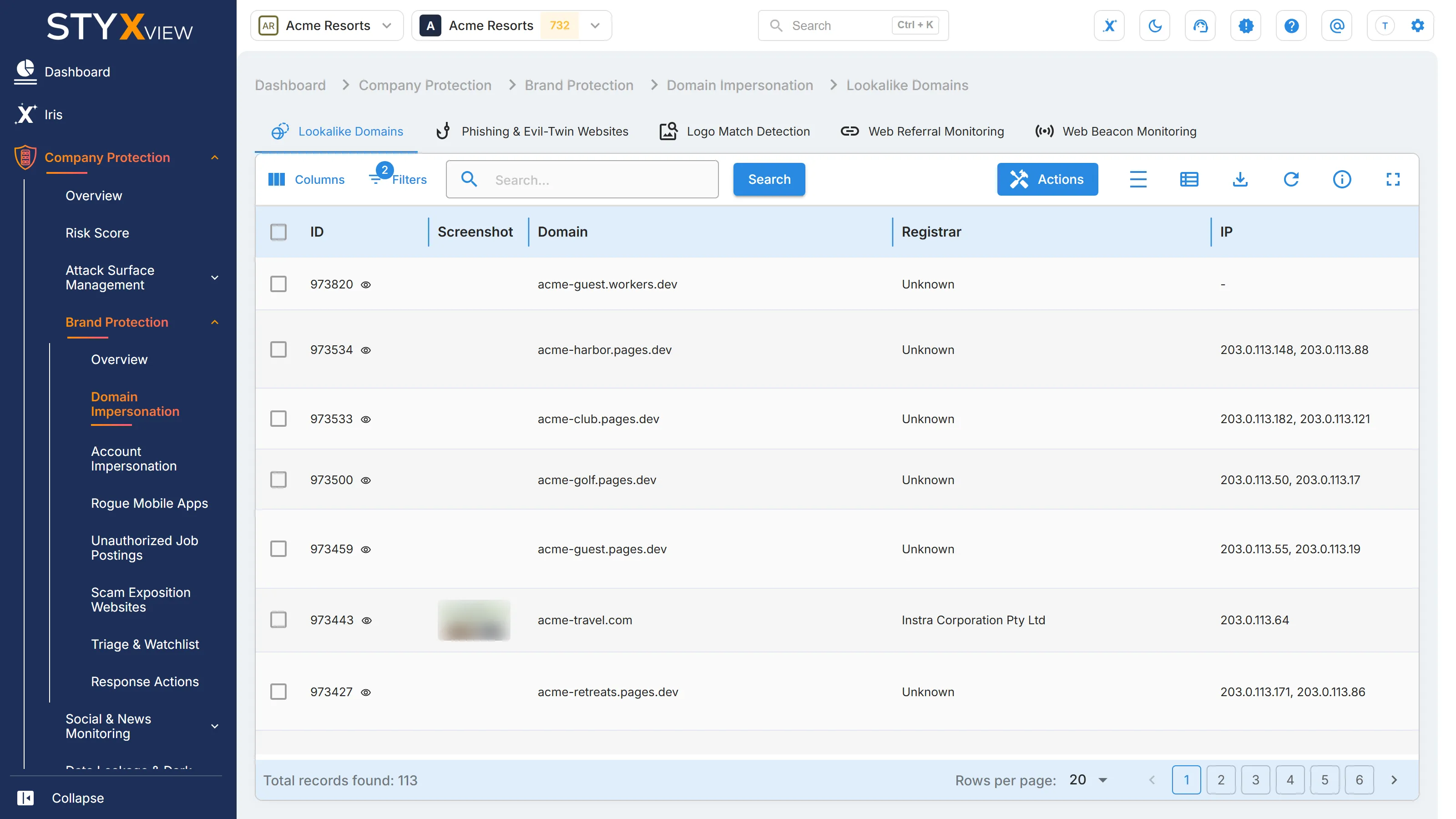
- In "Company Protection" → "Brand Protection": Lookalike Domains, Account Impersonation, Potential Employee Profiles, Rogue Mobile Apps, and Unauthorized Job Postings.
- In "Executive Protection": Account Impersonation.
-
Open the list that holds the finding, or open the finding itself.
-
In a list, select the finding with its checkbox. You can request a takedown for one finding at a time.
-
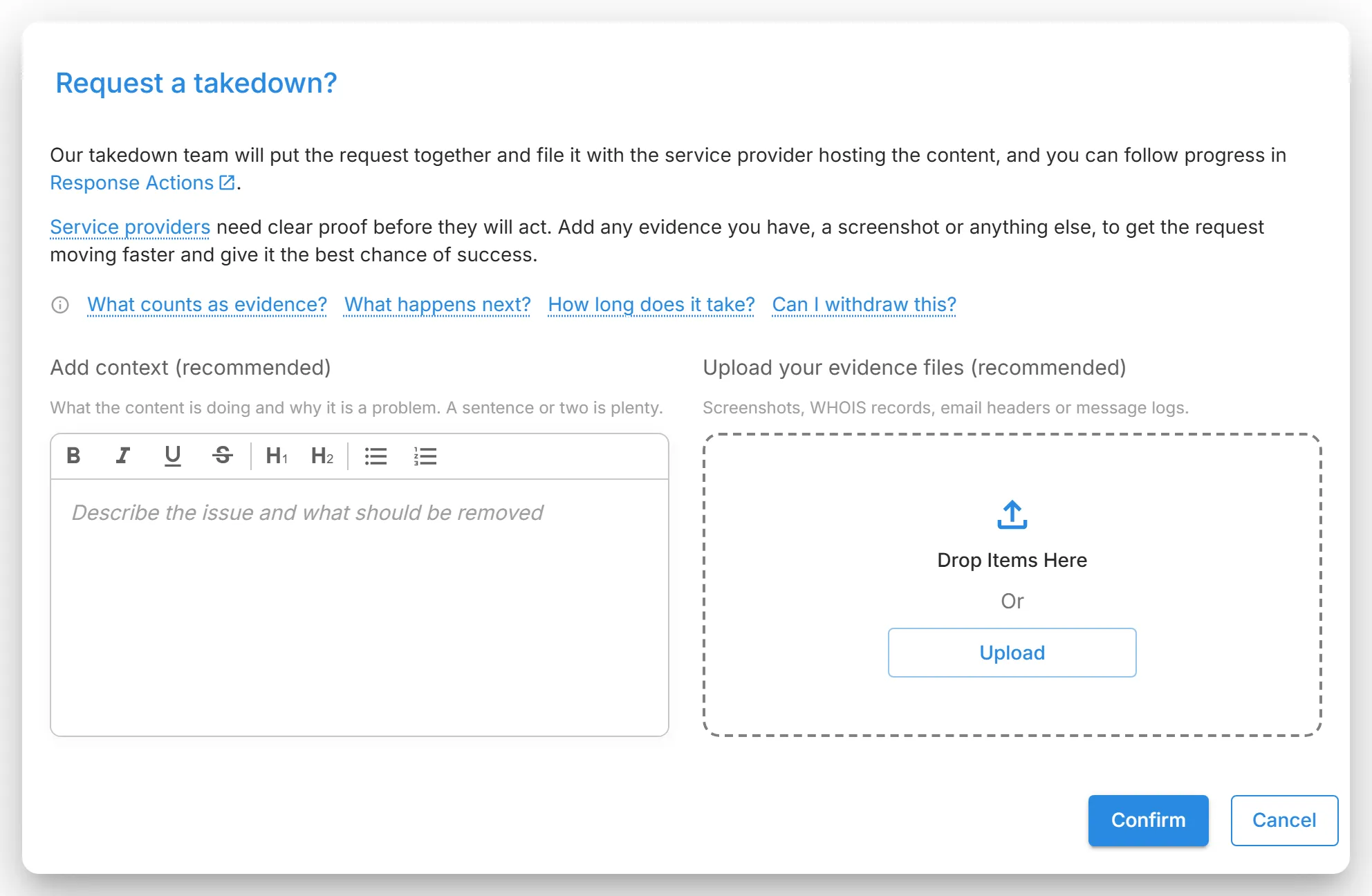
Select "Actions" → "Request Takedown". The "Request a takedown?" dialog opens.
-
Under "Add context (recommended)", describe what the content is doing and why it is a problem. A sentence or two is enough.
-
Under "Upload your evidence files (recommended)", add any evidence you have: screenshots, WHOIS records, email headers, or message logs. If you add files, select the checkbox confirming that they relate to this finding and can be shared with the relevant service providers.
-
Select "Confirm".
The request goes to the Styx takedown team and appears in "Response Actions" with the status New. "Request Takedown" is not available again for a finding that already has a request.
To raise a takedown for something StyxView has not detected, select "Submit Finding" on the Findings page and select "I would like to request a takedown for this finding".
How Long a Takedown Takes
Section titled “How Long a Takedown Takes”Typical time from the request to the content coming down:
| Finding type | Typical time |
|---|---|
| Account Impersonation | About 2 days |
| Unauthorized Job Postings | About 2 days |
| Lookalike Domains | About 3 days |
| Rogue Mobile Apps | About a week |
| Potential Employee Profiles | Varies |
These are typical times, not commitments. The service provider decides how quickly to act, and some decline.
Response Action Workflow
Section titled “Response Action Workflow”To follow a request, go to "Company Protection" → "Brand Protection" → "Response Actions". The list shows each response action with its status and latest log entry. See Response Actions for the list.
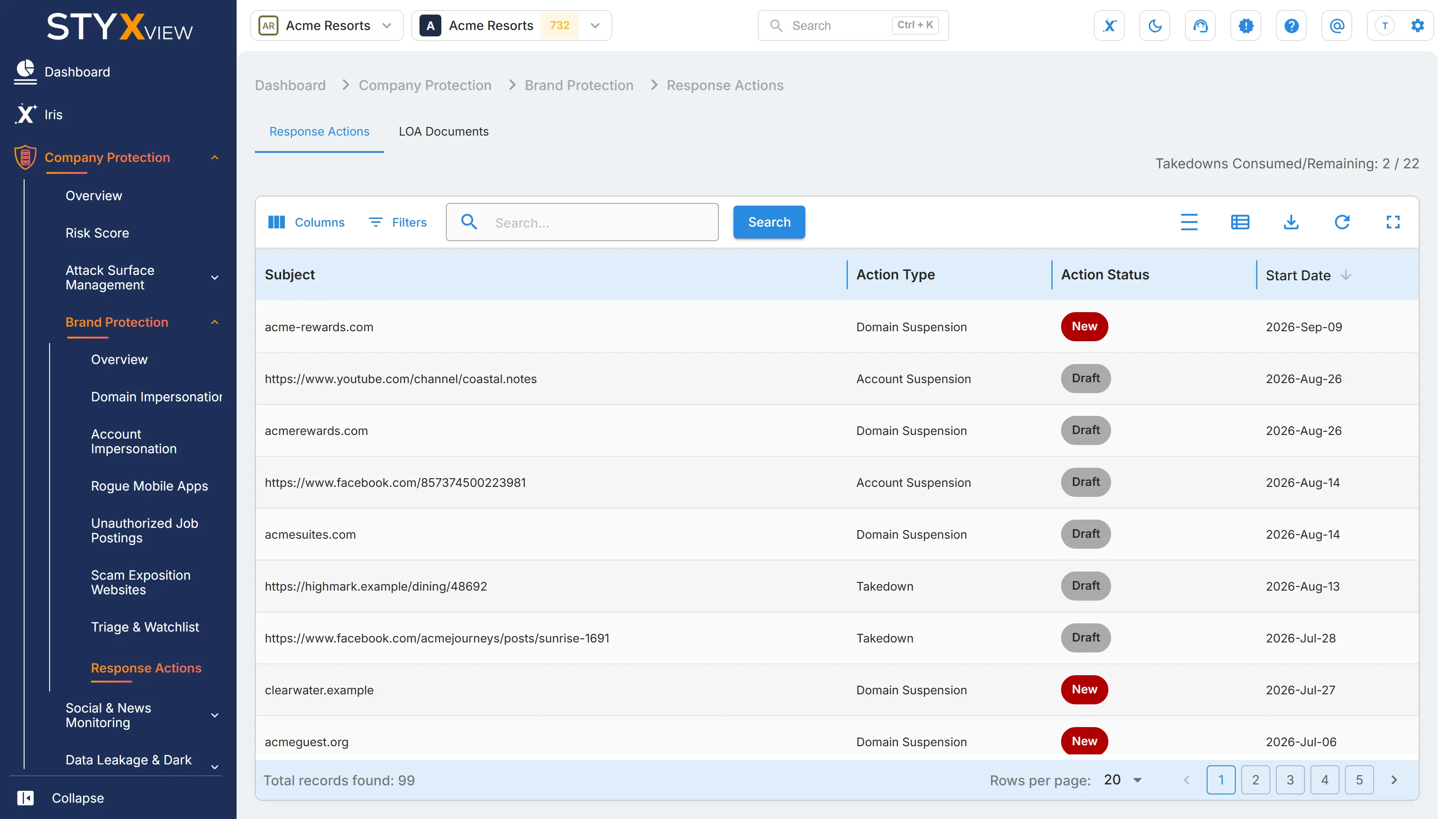
Select a response action to open it. Its page has a "Logs" tab and four stages:
- "1. Analysis Stage": the details of the finding the request was raised for.
- "2. Pre-Communication Stage": the communication streams for the request. Each stream names the service provider, the purpose, and the email address or reporting form used to contact it.
- "3. Communication Stage": for each stream, the reporting email address or form, the content submitted, related documents, and screenshots of the submission and of any reply received.
- "4. Review/Monitoring Stage": evidence that the content was removed, and the outcome. The case ends as Resolved, or as Closed without Action.
"Logs" records every step of the request. To add a comment of your own, enter it in "Add Comment" and select "Add Comment".
Letters of Authorisation
Section titled “Letters of Authorisation”Service providers often ask for a letter of authorisation (LOA) before they act for you. Keep yours on the "LOA Documents" tab of "Response Actions":
- Select "Download Template" to get the LOA template, and complete it.
- Select "Add Document".
- Enter the "Document Name", choose the document type in "Select the Document Type", and add the file.
- Optional: under "Attributes", add key and value pairs. Select "Add New Attribute" for more.
- Select "Create".
Takedowns: Common Challenges
Section titled “Takedowns: Common Challenges”- Not every case is eligible. Some findings, such as parked domains or inactive social accounts, do not qualify for a takedown.
- Proof and a letter of authorisation are often required. Service providers may ask for trademark documents, screenshots, or phishing email headers, and for an LOA.
- Enforcement can take time. Response times depend on the service provider and range from days to weeks.
- Threats can come back. Fraudulent domains, apps, or accounts may reappear after a takedown.
What is UDRP, and When Is It Useful
Section titled “What is UDRP, and When Is It Useful”The Uniform Domain-Name Dispute-Resolution Policy (UDRP) is an international arbitration process, set up by ICANN, that resolves disputes over domain names without going to court.
When UDRP applies:
- The domain is identical or confusingly similar to your trademark.
- The domain was registered or is used in bad faith, for example to resell it, block you, or disrupt your business.
- A domain that infringes your trademark is held without being used.
- The domain is cybersquatted for financial gain.
When UDRP does not apply:
- You hold no trademark rights.
- The domain uses generic or descriptive terms.
- The use is legitimate fair use, such as criticism, parody, or a fan site.
How Styx helps: Styx works with specialised law firms, or supports your own counsel with evidence and documentation.